








Empower Your Voice with
Interactive Polls
Gather feedback, make decisions together, and strengthen team bonds with Polls Wizard for Microsoft Teams.
Seamless Integration with MS Teams
Effortlessly connect and manage polls directly within MS Teams, enhancing your workflow with smooth, centralized polling and real-time updates.
- Quickly integrate with existing MS Teams environment
- Create, manage, and view polls directly within MS Teams
- Get instant notifications and updates on poll results
- Boost Team Productivity with Seamless Polls

User-Friendly Poll Creation
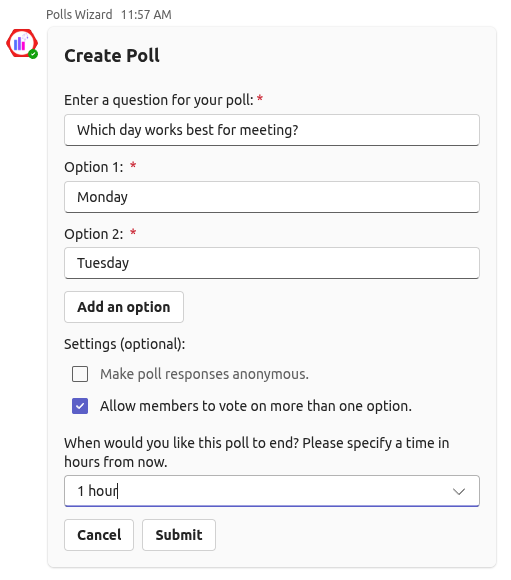
Design and launch polls effortlessly with an intuitive interface, allowing for quick setup and easy customization of questions and options.
- Design polls in just a few clicks with our intuitive interface
- Tailor poll questions, answer choices, and settings to fit your needs
- Engage team with interactive and visually appealing polls
- Make live changes to your polls to reflect the latest adjustments
Instant Results and Insights
Get real-time access to poll results, enabling swift and informed decision-making. Use the insights to understand team feedback instantly and take action as needed.
- Real-time results ensuring timely decision-making
- Detailed analytics and insights to make informed choices
- Generate visual reports with your team
- Access historical data for long-term analysis

Polls Wizard Pricing
Simple plans for fast decisions and better team engagement.
Free Trial
Get started with full features for 30 days.
- Unlimited polls
- 1500 responses per month
- Anonymous and non-anonymous responses
- Result visibility controls
- Poll scheduling
- Complete response history and tracking
Annual
Optimized for year-round team engagement.
- Unlimited polls
- 2000 responses per month
- Anonymous and non-anonymous responses
- Result visibility controls
- Poll scheduling
- Complete response history and tracking
Basic
For growing teams that want more responses and better engagement tools
- Unlimited polls
- 5000 responses per month
- Anonymous and non-anonymous responses
- Result visibility controls
- Poll scheduling
- Complete response history and tracking
Standard
For growing teams that need more polls and higher response capacity
- Unlimited polls
- 25000 responses per month
- Anonymous and non-anonymous responses
- Result visibility controls
- Poll scheduling
- Complete response history and tracking
Pro
For teams that want deeper insights and advanced analytics
- Unlimited polls
- 45000 responses per month
- Anonymous and non-anonymous responses
- Result visibility controls
- Poll scheduling
- Complete response history and tracking
Enterprise
Custom security and scale for large scale polling.
- Tailored solutions
- Flexible pricing
- Dedicated Support